

A/B testing a B2B lead form means splitting traffic between 2 or more versions of a form and keeping the one that produces more marketing or sales-qualified leads, not more submissions.
The tests worth running are field order, qualifying fields, step count, button copy and the step after submit. Judge every test on MQL and SQL rate, against a minimum conversion floor set before launch.
Most lead form changes we see in Indian B2B companies are made on opinion. A founder decides the form is too long, someone cuts 3 fields, submissions go up, and the change gets called a win.
Then sales spends the next month calling students and job seekers. When teams do run tests, it is often to confirm a decision that was already made.
A lead form test judged on submissions will usually crown the shorter form. A test judged on sales-qualified leads often won’t. Below are the 6 lead form tests we think are worth running: 3 that most teams never think of and 3 worth re-running every quarter. Then what to do when your traffic is too thin for a clean result.
Key takeaways
- Judge a lead form test on MQL and SQL rate. Submission rate is a supporting metric, not the verdict.
- The order of fields, and the order of options inside a field, changes who submits and what they tell you.
- “Keep your form short” is right only when the form is not qualifying. Decide the form’s job before you cut fields.
- If 1 page cannot reach significance, pool pages with the same intent and test them as one.
- Paid and organic visitors can react differently to the same variant. Check the result by source before you ship it everywhere.
What does a lead form A/B test actually measure?
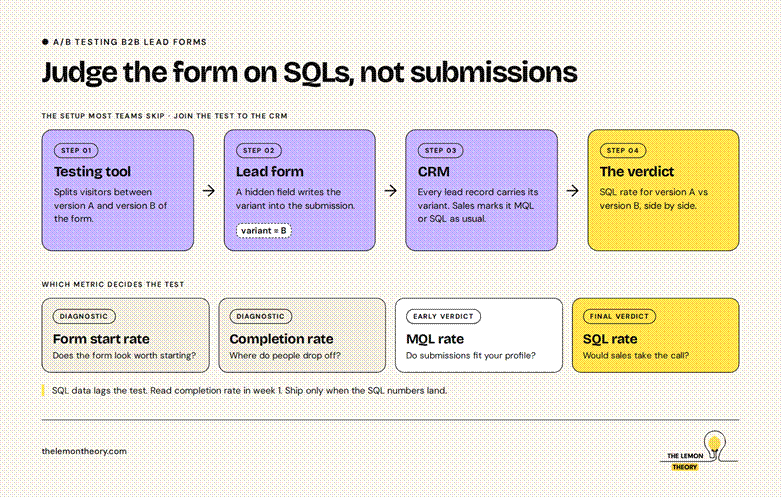
A lead form A/B test should measure qualified pipeline per visitor, not submissions. That only works if every lead carries its variant into your CRM, so you can count MQLs and SQLs for version A and version B side by side.
This is the setup step most teams skip. The testing tool knows which variant each visitor saw. The CRM knows which leads sales accepted.
Nothing joins the two. Fix it with a hidden form field that writes the variant name into the lead record. It takes an hour and it changes what you are able to conclude.
Then decide which metric is the verdict and which ones are diagnostics:
| Metric | What it tells you | How to use it |
| Form start rate | Whether the form looks worth starting | Diagnostic |
| Completion rate | Where people drop off inside the form | Diagnostic |
| MQL rate | Whether submissions fit your profile | Early verdict |
| SQL rate | Whether sales would take the call | Final verdict |
| Meeting show rate | Whether the step after submit holds intent | Diagnostic for post-submit tests |
The trade-off is speed. SQL data lags the test by however long your sales team takes to qualify. You can read the completion rate in week 1. Don’t ship until the SQL numbers land.
Which lead form tests do most B2B teams overlook?
The 3 most overlooked lead form tests are field and option order, the copy around the submit button, and the step after submission. They get skipped because they barely change how the form looks. They do change who submits and how many of those people become real conversations.
1. Field order and option order
Control: Name, Email, Company, Phone, Designation. The Designation dropdown lists examples: CEO, Founder, Manager, Executive, Student.
Variant: Same fields, Designation moved to the top, Student listed first, if you get a lot of students and spam.
Judge it on: Share of submissions marked Student, and SQL rate of everyone else.
Order is not neutral. Where an option sits changes how often it gets picked, which means your lead scoring is partly scoring your form design. More on this below.
2. The line next to the button
Control: A button that says “Submit”.
Variant: “Get my audit”, with 1 line underneath: “A strategist replies within 1 working day.”
Judge it on: Completion rate and SQL rate.
Only promise what sales actually deliver. A response time you miss turns a form test into a trust problem.
3. What happens after submit
Control: A thank-you page that says “We’ll be in touch.”
Variant: Leads who match your profile see a calendar to book straight away. Everyone else sees a thank-you page with 1 relevant case study.
Judge it on: Meetings booked per 100 submissions, and show rate.
The form ends at submit. The lead does not. If you’re testing forms without touching this step, you’re optimising the half of the journey sales cares about least. We cover the wider version of this in how we build a predictable B2B lead generation engine.
Which lead form tests should you keep re-running?
Re-run tests on qualifying fields, single-step versus multi-step, and the offer on the button. The right answer to each shift is when your traffic mix, ad channels or sales capacity changes, so a winner from last year is a hypothesis this year.
4. How many qualifying fields
Control: 4 fields: name, work email, company, phone.
Variant: The same 4, plus company size and designation.
Judge it on: SQLs per 1,000 visitors, and sales hours spent per SQL.
This is where “keep your form short” breaks. If sales calls every lead within the hour, a short form and qualifying on the call can work. If sales has 2 people and 200 leads, the form has to do the filtering. Expect fewer submissions from the variant. That is the point, not a failure.
5. Single step or multi-step
Control: All fields on 1 screen.
Variant: Step 1 asks 1 easy, relevant question (“What do you need help with?”). Step 2 asks for contact details.
Judge it on: Completion rate and SQL rate together.
Multi-step forms can raise completions. Check whether the extra completions are qualified before you call it.
6. The offer on the button
Control: “Book a demo”.
Variant: A specific deliverable, such as “Get a teardown of your landing page”.
Judge it on: SQL rate, and close rate once deals mature.
Re-run this whenever a new channel starts sending traffic. Someone who clicked a LinkedIn ad and someone who searched your category on Google arrived with different levels of intent.
What if your traffic is too low for a clean A/B test?
Pool pages that share the same intent and run 1 test across all of them, so their traffic adds up to a usable sample. The other route is testing on paid traffic, where you control volume.
Paid and organic visitors can behave differently, so check the result by source before shipping it sitewide.
Pooling works when the pages share the same form, the same offer and the same buyer intent. 8 service pages that each end in the same “Talk to us” form can be tested as 1.
A pricing page and a blog post cannot, even if they carry the same form, because the people on them are at different stages.
Set your stop rules before the test starts, not halfway through:
- A minimum number of conversions per variant e.g. “we don’t call a test below 30 SQLs per variant”
- Statistical significance, so you know the result is a repeatable pattern and not a good week.
- Full business weeks, so Monday traffic and Saturday traffic are both in the sample.
If a test ends below your floor, don’t ship it and don’t call it. Write down what you saw and run it again with more traffic.
To decide what to test first, use a prioritisation model instead of a debate. We use PIE (Potential, Importance, Ease). CXL’s PXL model is stricter and worth reading if you want more detail.
What this looks like in practice
On one B2B account, a noticeable share of form submissions were students. Sales was spending calls on people who would never buy.
This was in a AI App software development company, where students were keep on how it worked but wasted sales time.
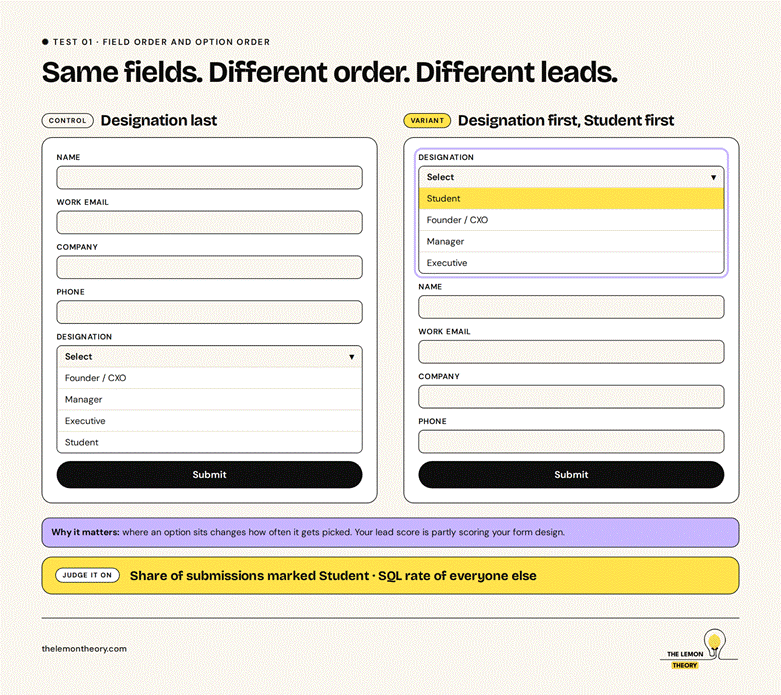
We added a Designation field so students could identify themselves and be routed away from sales.
The interesting part was not the field. It was the order of the options. When Student was listed first, far more people selected it than when it sat second or third.
That changed how we think about every qualifying field. The answers a form collects are partly a product of the form. If your lead score depends on a dropdown, the order of that dropdown is quietly setting your MQL rate.
What most people get wrong about lead form testing
The biggest gap is not technique. It is that most teams aren’t testing at all, and the ones who are often run tests to prove an opinion right. A test with a conclusion already decided is a presentation, not an experiment.
The second mistake is treating “shorter is better” as a law. It is a reasonable default for a newsletter signup. For a B2B form, the right length depends on 2 questions. Is this form your lead qualifier? And what happens to the lead after they submit?
Cut fields without answering those and you move the qualifying work onto sales, who are the most expensive people in the funnel to spend on it.
The third is honest about limits. A/B testing needs volume. It earns its keep on B2B sites that send real traffic to a lead form.
If your form gets 20 submissions a month, session recordings and 10 conversations with your sales team will teach you more than a test that never reaches significance.
Frequently asked questions
How many fields should a B2B lead form have?
There is no right number. A form that has to qualify leads needs the fields that let sales decide who to call, such as company size and designation. A form where sales qualifies every lead by phone can be shorter. Test the field count and judge it on SQLs per visitor, not on submission rate.
How long should I run an A/B test on a lead form?
Run it until each variant reaches the minimum number of conversions you set before launch, reaches statistical significance, and covers full business weeks.
For B2B, wait for SQL data too, which can lag the test by your sales qualification time. Stopping early because one version looks ahead is the most common way to ship a false winner.
What can I do if my website doesn’t get enough traffic to A/B test?
Group pages with the same intent, the same form and the same offer, and run 1 test across all of them so the traffic adds up.
You can also test on paid traffic, but check results by source before rolling out to organic. Below that, use session recordings and sales feedback instead.
Should I judge a form test on conversion rate or lead quality?
Lead quality. Submission rate shows whether more people filled the form. MQL and SQL rate show whether those people were worth calling. A variant that raises submissions while lowering SQL rate has made sales slower, not the funnel better. Pass the variant name into your CRM so you can measure both.
Are multi-step forms better than single-step forms for B2B?
Sometimes. Multi-step forms that open with an easy, relevant question can raise completion rates.
Whether that is a win depends on whether the extra completions are qualified. Test it on your own traffic and judge it on completion rate and SQL rate together.
Does the order of fields in a form really matter?
Yes. Field order changes where people abandon the form, and option order inside a dropdown changes which answer people pick.
On one B2B form, listing Student first in a designation field produced far more Student selections than listing it second or third. That affects both who submits and how your leads get scored.
Where to start
Add a hidden field to your lead form that writes the traffic source and test variant into your CRM. Then pull the last 90 days of form leads and compare SQL rate by source and by page.
That one report will tell you where a form test is worth running first. If you want a second pair of eyes on it, book a CRO audit with us. See what our CRO and performance services cover and how we structure full-funnel B2B strategy.
Khadija Karachiwala is co-founder of The Lemon Theory, where she leads CRO, analytics, email and paid search.
She has an MBA from MICA and previously worked at Builder.ai, Digital Avenues and The Media Ant. She has spent most of her career asking sales teams which leads they actually wanted.